Geek Bar Not Hitting? 8 Fixes Before You Bin It
A Geek Bar not hitting is usually one of eight things, and six of them are free to fix. Work through them in order before you write the device off.
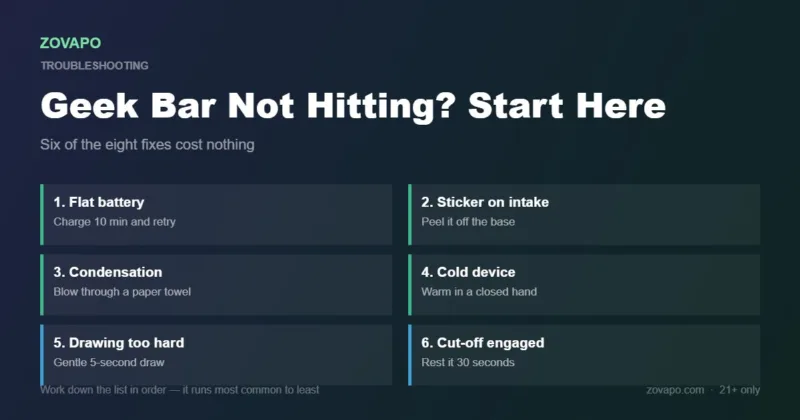
A Geek Bar not hitting is usually one of these, in order of how often it turns out to be the cause: a flat battery, the shipping sticker still over the air intake, condensation blocking the mouthpiece, cold, drawing too hard, or the ten-second cut-off engaging from chain-vaping.
Six of the eight cost nothing. Only the last two — empty tank, dead cell — mean the device is genuinely finished.
- Most cases of a Geek Bar not hitting come down to charge, a blocked air intake, or condensation in the mouthpiece.
- A gentle five-second draw produces more vapour than a hard two-second one.
- The ten-second cut-off is a safety feature. Rest the device 30 seconds and it resumes.
- Pulse Mode roughly halves how long the device lasts, which reads as sudden weakness.
- Never puncture, pry open or heat a disposable to revive it.
Start here: is your Geek Bar not hitting, or not powering on?
Before working through the Geek Bar not hitting list, check one thing: does the device do anything? A light, a screen, a faint click. If there is any sign of life, the battery is not completely dead and the problem is almost certainly airflow or technique rather than the cell. That single observation cuts the list in half.
The other thing worth knowing about a Geek Bar not hitting is that a Geek Bar not hitting is rarely a manufacturing fault. It happens, but it is far down the list. Work the free fixes first.
Eight fixes for a Geek Bar not hitting, in order
These run roughly from most common to least. If your Geek Bar is not hitting, work through them in sequence rather than skipping ahead — the cheap fixes really are the likely ones.
Every Geek Bar above the entry models is USB-C rechargeable, and a flat battery is far and away the most common cause of a Geek Bar not hitting. On screen models the battery readout tells you directly. On models without a screen, plug it in for ten minutes and try again. A device at 0% often still lights up while producing almost no vapour, which is what makes this one easy to misdiagnose.
If this was it: Charge it properly and the device is fine. See our charging guide for what not to plug it into.
New devices ship with a small sticker or plug covering the air intake at the bottom. It is easy to miss, and with it in place the device draws almost nothing no matter how hard you pull.
If this was it: Peel it off and it works immediately.
E-liquid and condensed vapour collect in the mouthpiece channel, especially in a pocket or a bag. That slug of liquid blocks airflow and can also give you a mouthful of neat liquid. Fold a paper towel, press it over the mouthpiece and blow firmly downward through the device from the mouthpiece end, so the liquid goes into the towel.
If this was it: Airflow returns straight away. Do this every couple of days as maintenance.
Lithium cells lose output in the cold, and a device left in a car overnight or carried outside in winter can read as dead. Vape juice also thickens as it cools, so the wick draws more slowly.
If this was it: Hold it in a closed hand for five minutes, or keep it in an inside pocket. Never apply direct heat, a radiator or a hair dryer to it.
Disposables are designed for a gentle, extended draw rather than a sharp one. Pulling hard actually reduces vapour, because it floods the coil faster than it can vaporise and pulls in unvaporised liquid. It also triggers the device’s own cut-off.
If this was it: A five-second gentle draw produces noticeably more vapour than a two-second hard one.
Every Geek Bar has an overtime protection cut-off, typically around ten seconds of continuous draw, and chain-vaping trips it. When it engages the device stops firing and usually blinks. It is a safety feature, not a fault.
If this was it: Rest it for 30 seconds and it resumes. If you hit this often, you are drawing longer than the device expects.
On dual-mode devices, Pulse Mode draws much more power and drains both battery and liquid far faster. A device that felt fine yesterday and weak today may simply be low on one of them because it has been running in the higher mode.
If this was it: Switch back to Regular Mode. The vapour is slightly lighter but the device lasts roughly twice as long.
On screen models the e-liquid readout tells you. Without a screen, the tell is a taste that has turned harsh or burnt and does not recover. A disposable cannot be refilled, and attempting to open one is not safe.
If this was it: The device is finished. Dispose of it at a battery-recycling point rather than in household waste.
Geek Bar not hitting: symptom to cause, at a glance
| What it is doing | Most likely cause | Go to |
|---|---|---|
| Lights up, no vapour | Flat battery, or sticker still on the intake | Fixes 1 and 2 |
| Nothing at all, no light | Battery fully depleted, or device finished | Fixes 1 and 8 |
| Gurgling, liquid in the mouth | Condensation pooled in the mouthpiece | Fix 3 |
| Weak for a few puffs then stops | Overtime cut-off engaging | Fix 6 |
| Weak outdoors, fine indoors | Cold battery and thickened liquid | Fix 4 |
| Was strong, now weak | Running in Pulse Mode, or liquid low | Fixes 7 and 8 |
| Blinking light, no fire | Cut-off engaged, or low-voltage protection | Fixes 1 and 6 |
| Harsh or burnt, does not recover | Wick dry or liquid gone | Fix 8 |
What not to try on a Geek Bar not hitting
Most of the advice circulating online for a Geek Bar not hitting is harmless. Some of it is not, and it is worth being explicit about which.
Safe to do
- Charge it with a low-output USB-C charger
- Blow condensation out through a paper towel
- Warm it in a closed hand
- Take slower, longer draws
- Rest it for 30 seconds after a cut-off
- Wipe the charging port with a dry cotton bud
Do not do
- Puncture, pry open or cut into the device
- Try to refill or rewick a disposable
- Apply direct heat — radiator, hair dryer, hot water
- Charge it with a high-wattage fast charger
- Keep using it if it is hot, swollen or leaking
- Bypass the cut-off in any way
Geek Bar not hitting at all: how to tell it is finished
Three signals together mean a Geek Bar not hitting is done rather than misbehaving: the taste has turned harsh and does not recover after resting, vapour is thin even on a full charge, and on screen models the e-liquid readout is at or near zero. At that point the honest answer is that the device has reached the end of its life.
If your Geek Bar is not hitting because it is genuinely spent, dispose of it at a battery-recycling point. It contains a lithium cell, which should not go in household waste. Then pick the next one: the Pulse 15K is the cheapest way back in at $15.99, the Pulse X 25K gives you a screen and a much bigger tank, and the Pulse X2 50K runs roughly three times as long as the 15K. The 2026 Geek Bar Map compares all of them.
If your Geek Bar is not hitting and it is finished
Every Geek Bar model, in stock and shipped from authorised distribution.
Shop Geek BarPulse 15K — $15.99Everything under $15Frequently asked questions
Why is my Geek Bar not hitting but it lights up?
A light with no vapour almost always means one of two things: the battery is too low to fire the coil properly, or the shipping sticker is still covering the air intake on the base. Charge it for ten minutes and check the underside before assuming anything worse.
Why is my Geek Bar blinking and not working?
Blinking usually means a protection circuit has engaged — either the ten-second overtime cut-off from a long draw or chain-vaping, or low-voltage protection when the battery is flat. Rest it for 30 seconds, then charge it. Both are designed behaviour rather than faults.
How do I unclog a Geek Bar?
Fold a paper towel over the mouthpiece and blow firmly down through the device from the mouthpiece end, so the pooled liquid goes into the towel. Do not poke anything into the mouthpiece or airway, and never puncture the shell.
Why does my Geek Bar work in the house but not outside?
Cold. Lithium cells lose output at low temperature and vape liquid thickens, so the wick draws more slowly. Warm the device in a closed hand for a few minutes or carry it in an inside pocket. Never apply direct heat.
Can you fix a dead Geek Bar?
If the battery is flat, yes — charge it. If the e-liquid is gone, no. Disposables cannot be refilled or rewicked, and opening one to try is unsafe because of the sealed lithium cell inside. At that point dispose of it at a battery-recycling point.
Why did my Geek Bar stop working after one day?
Check the mode first. Pulse Mode roughly halves the rated puff count, so a device run in it will fade far sooner than expected. If it genuinely died in a day in Regular Mode on a full charge, verify the security code — short life is a common counterfeit symptom.
Does hitting a Geek Bar harder help?
No, it does the opposite. Drawing hard floods the coil faster than it can vaporise, pulls unvaporised liquid into the mouthpiece and can trigger the cut-off. A gentle five-second draw produces noticeably more vapour.
Sources & further reading: device behaviour cross-checked against the Pulse 15K and Pulse X 25K specifications; VapeOwls Geek Bar Pulse features guide; VapeTrends; Geek Bar official.
Ready to shop?
Everything in this guide is stocked at Zovapo — 100% authentic, fast U.S. shipping, free standard shipping over $75 (clearance items excluded). Adults 21+ only.