How to Charge a Geek Bar Safely (and Why the Fast Charger Is a Bad Idea)
Charge a Geek Bar without damaging it: the right cable, the right wall plug, why fast chargers do not help, and the warning signs to stop immediately.
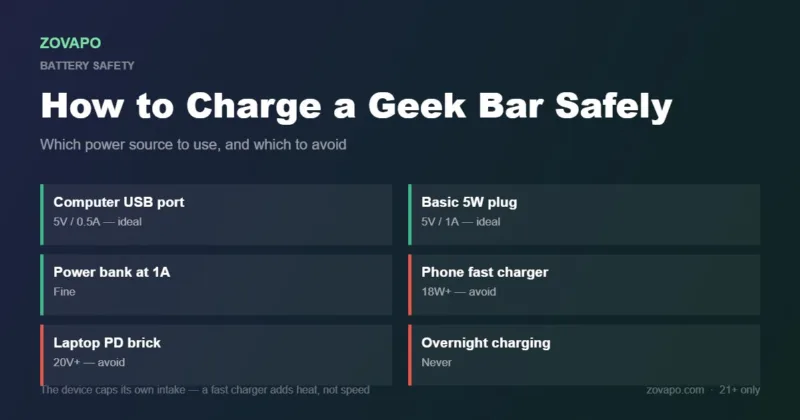
To charge a Geek Bar safely: use a standard USB-C cable and a low-output wall plug or a computer USB port — roughly 5V at 0.5A to 1A. Charge it on a hard surface, stay in the room, and unplug it when the readout reaches full.
Do not use a fast charger. An 18W+ phone or laptop brick will not charge the device any faster, because its internal converter caps what it draws. All the extra capability does is put unnecessary thermal stress on a small cell.
- Use 5V at 0.5A to 1A to charge a Geek Bar — a computer USB port or a basic 5W plug.
- A fast charger does not charge it faster. The device caps its own intake.
- Charge on a hard surface, in the room, and unplug when full.
- Most charging faults are the cable or a lint-packed port, not the device.
- Hot, swollen or leaking means stop immediately and recycle it.
What you need to charge a Geek Bar
You can charge a Geek Bar with almost any USB-C cable, but the power source behind it is what decides whether you are being kind to the battery.
Every Geek Bar above the entry tier is USB-C rechargeable — the Pulse X 25K, the Pulse 2 25K, the Pulse X2 50K, the CLR 50K, the Ice Prince 50K and the Mate 60K all take a cable. The Pulse 15K does too.
What you need to charge a Geek Bar is unglamorous: a working USB-C cable and a low-output power source. That is it. No cable is supplied in the box on most models, which is deliberate — and it is also why so many people reach for the fastest charger in the drawer, which is exactly the wrong instinct.
How to charge a Geek Bar, step by step
You need a standard USB-C cable. The one that came with a phone is usually fine. Avoid frayed cables, cables with a loose connector, and the very cheap unbranded ones — a bad cable is a far more common cause of charging problems than a bad device.
A computer USB port (0.5A) or a basic 5W wall plug (1A) is ideal. This is the step people get wrong, and it is the whole subject of the next section.
Pocket lint packs into a USB-C port surprisingly fast. Look into it, and if there is debris, remove it with a dry cotton bud or a wooden toothpick. Never use anything metal, and never use liquid.
It should go in with a distinct, firm click and no wobble. If it feels loose or mushy, stop and check the port — forcing a cable is the main cause of a port detaching internally, which cannot be repaired.
A desk or a counter, not a bed, sofa or carpet. Fabric traps the heat the device gives off while charging.
Do not charge it overnight or leave the house with it plugged in. This is standard lithium-battery practice and it costs you nothing.
On screen models the readout tells you. Leaving it connected long after it is full serves no purpose. If the indicator has not settled after about two hours, unplug it regardless.
Why you should not charge a Geek Bar with a fast charger
This is the part worth understanding properly, because the instinct most people have when they charge a Geek Bar is exactly backwards.
A modern fast charger — the 18W, 30W or 65W brick that came with a phone or a laptop — negotiates a higher voltage and current with the device it is charging. Big batteries benefit. A vape battery does not, for a simple reason: the device’s own charging circuit caps how much it will draw. Plugging in a 65W charger does not deliver 65W to a 700 mAh cell. It delivers whatever the device asks for, which is about 1A.
So the fast charger gives you no speed benefit at all. What it does give you is a power supply operating far from its efficient range, feeding a small circuit that was designed around a much simpler supply, generating more heat in the process. Industry guidance on this is consistent: high-wattage fast chargers “typically do not speed up charging for these devices and may stress internal circuits.”
Heat is the thing to avoid whenever you charge a Geek Bar. Lithium cells age faster warm, and a small cell in a sealed plastic shell has nowhere to dump heat. The practical consequence is a device that holds less charge sooner — and in the worst case, a swollen cell, which is the point at which you stop using it entirely.
Do and do not, when you charge a Geek Bar
Do
- Use a standard USB-C cable in good condition
- Use a computer USB port or a basic 5W plug
- Charge on a hard, non-flammable surface
- Stay in the room while it charges
- Unplug it once the readout is full
- Keep the port free of lint
- Let a cold device warm up before charging
Do not
- Use an 18W+ fast charger or laptop PD brick
- Charge overnight or while out of the house
- Charge on a bed, sofa or carpet
- Force a cable that does not seat cleanly
- Poke metal into the charging port
- Keep charging a device that feels hot
- Charge a swollen, leaking or damaged device
How long should it take to charge a Geek Bar?
| Power source | Typical output | Rough full charge | Verdict |
|---|---|---|---|
| Computer USB-A port | 5V / 0.5A | ~60–90 min | Ideal |
| Basic 5W wall plug | 5V / 1A | ~45–60 min | Ideal |
| Phone fast charger (18W+) | 9V+ negotiated | No faster | Avoid |
| Laptop USB-C PD brick | 20V+ negotiated | No faster | Avoid |
| Car USB port | Varies widely | Varies | Only if low-output |
| Power bank | Usually 5V / 1–2A | ~45–60 min | Fine at 1A |
If it is taking dramatically longer to charge a Geek Bar than the table suggests, suspect the cable first and the port second. Both are far more likely than a failed battery.
Warning signs to stop charging immediately
- The device is hot to hold. Not warm — warm is normal. Uncomfortable to hold means unplug it now.
- The shell has swollen or bulged. That is the cell venting gas. Stop using it, do not charge it again, recycle it.
- There is a chemical or sweet solvent smell. Unplug and move it somewhere ventilated and non-flammable.
- It is leaking. Concentrated nicotine liquid should not be handled. Wash your hands if you contact it.
- It fires on its own after charging. A sensor fault. Stop using the device.
- The indicator never settles. If it has not finished after about two hours, unplug it.
None of these are common, and none of them are reasons to be nervous when you charge a Geek Bar normally. They are the specific signals that mean this particular device has reached the end of its usable life — at which point the replacement costs a great deal less than the alternative.
If yours will not charge at all and the cable and port are both fine, our guide to a Geek Bar not hitting covers the rest of the diagnostic sequence. If the screen is showing something you do not recognise while it charges, the screen symbols guide explains every icon.
Models you can charge
Every model above the entry tier takes USB-C, so one cable covers the range.
Pulse X 25KPulse X2 50KAll Geek BarFrequently asked questions
How do I charge a Geek Bar?
Plug a standard USB-C cable into the port on the device and into a low-output power source — a computer USB port or a basic 5W wall plug. Charge it on a hard surface, stay in the room, and unplug it when the readout reads full.
What charger does a Geek Bar use?
USB-C. Any standard USB-C cable works. What matters is the power source: aim for 5V at 0.5A to 1A rather than a fast charger.
Can I use a fast charger on a Geek Bar?
You can, but it will not charge any faster and it is not a good idea. The device’s own circuit caps how much current it draws, so the extra capability delivers no benefit while generating unnecessary heat. Heat is what ages a small lithium cell.
How long does a Geek Bar take to charge?
Roughly 45 to 60 minutes on a basic 5W plug, or 60 to 90 minutes from a computer USB port. If it is taking dramatically longer, suspect the cable or a lint-packed port before the battery.
Can you charge a Geek Bar overnight?
Don’t. Leaving any lithium device charging unattended is unnecessary risk for no benefit, and these charge in under an hour anyway. Unplug it once the readout is full.
Why is my Geek Bar not charging?
In order of likelihood: a faulty or frayed cable, lint packed into the charging port, a power source that is not delivering, or a port that has detached internally from a cable being forced. Try a different cable first — it resolves most cases.
Is it normal for a Geek Bar to get warm while charging?
Slightly warm is normal. Hot enough to be uncomfortable to hold is not — unplug it. If the shell has swollen or it smells chemical, stop using the device entirely and take it to a battery-recycling point.
Can I charge a Geek Bar with a phone charger?
Yes, if it is a basic low-output plug. A modern fast-charging phone brick will work but offers no speed benefit and runs hotter, so a simple 5W plug is the better choice.
Sources & further reading: charging-rate guidance for rechargeable disposables per industry best-practice documentation; device specifications cross-checked against the Pulse X 25K product page; VapeOwls Pulse X 25K listing; VapeTrends; Geek Bar official.
Ready to shop?
Everything in this guide is stocked at Zovapo — 100% authentic, fast U.S. shipping, free standard shipping over $75 (clearance items excluded). Adults 21+ only.